> ## Documentation Index
> Fetch the complete documentation index at: https://docs.hextrade.io/llms.txt
> Use this file to discover all available pages before exploring further.
# Setting up Copy Trading
> Manage multiple accounts simultaneously with different risk profiles. Create copy-trade groups with master and follower accounts.
# Setting up Copy Trading
Copy trading on Hextrade lets you efficiently manage **multiple accounts with different risk profiles** from a single dashboard. One account acts as the **master** — any trade it makes is automatically replicated across all **follower** accounts in the group.
Visit [**dash.hextrade.io/copy-trade-groups**](https://dash.hextrade.io/copy-trade-groups) to get started.
***
## Key Features
Set a **risk multiplier** per group based on the master account's position size. Control how aggressively followers scale their trades.
Add detailed **descriptions** to each group — document the origin, logic, or strategy behind the account grouping.
Create as many groups as your plan allows, each with a **unique name** and distinct risk profile.
Trades placed on the master are **instantly replicated** to all active followers — no manual intervention required.
***
## ️ Creating a Copy Trade Group
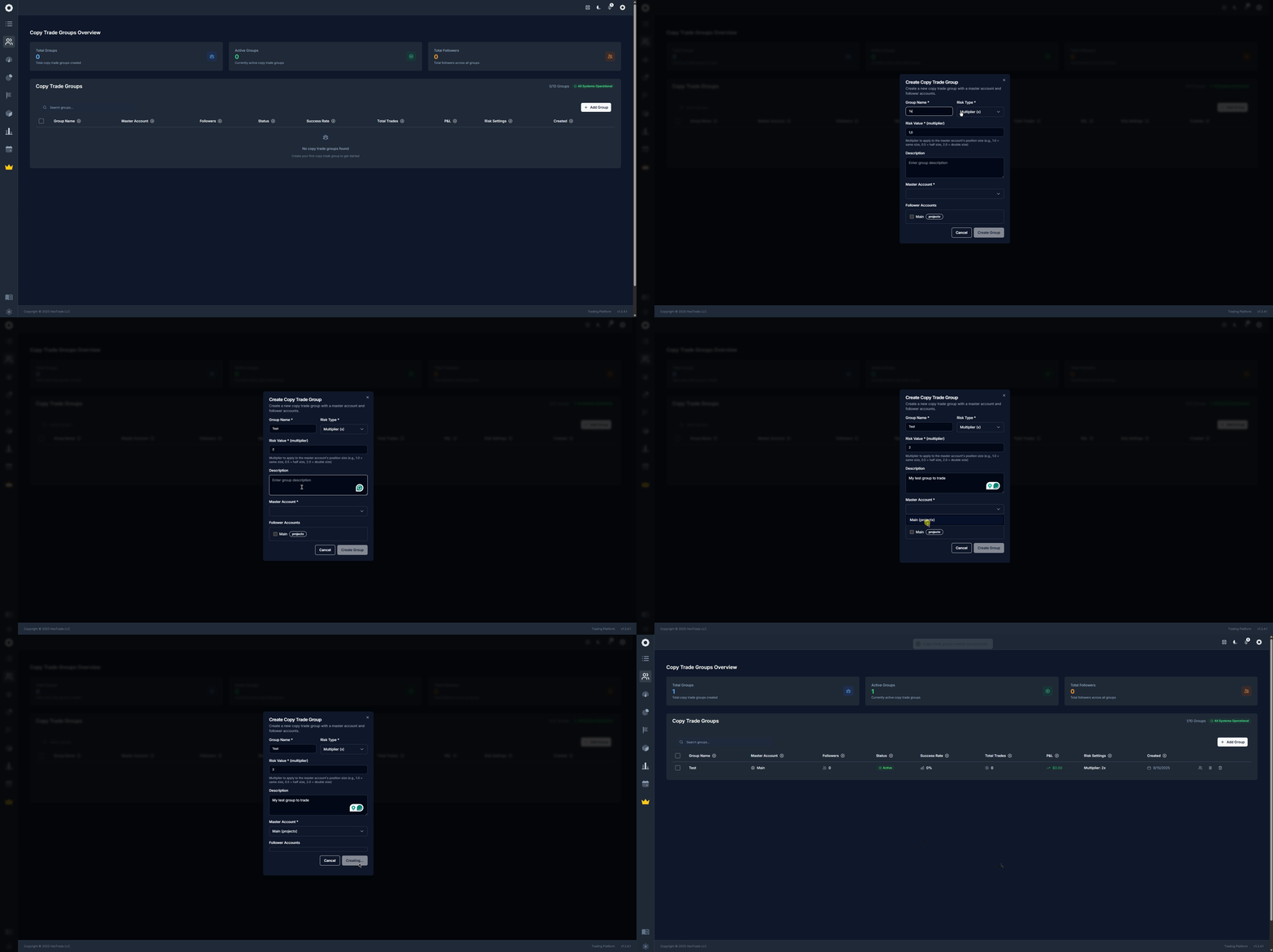
Visit [dash.hextrade.io/copy-trade-groups](https://dash.hextrade.io/copy-trade-groups) and click **"Add Group"**.
Give your group a distinctive, memorable name that reflects the strategy (e.g. "NQ Scalp — Low Risk" or "Tradovate Primary").
Use the description field to document the strategy's logic, source, or any notes for future reference. This is especially useful when managing multiple groups.
Choose the **master account** — this is the account whose trades will be copied to all followers. It should be the account running your main algorithm or strategy.
Select one or more **follower accounts**. These can be accounts across different brokers (all must be connected — see [Trading Accounts](/automated-trading/trading-accounts)).
Define the **risk multiplier** for each follower:
* `1.0` = same position size as master
* `0.5` = half the size (lower risk)
* `2.0` = double the size (higher risk)
Always tailor the multiplier to each account's available capital and prop firm rules. Running a high multiplier on a funded account can lead to rule violations.
Click **Save**. Set the group status to **Active** to begin copying trades immediately.
 ***
## Managing Groups
Once a group is created, you can:
| Action | How |
| ------------------------- | -------------------------------------------------------------------------- |
| **View** | Open a group to see the master, followers, trade history, and stats. |
| **Activate / Deactivate** | Toggle the group on or off. Deactivated groups stop copying trades. |
| **Edit** | Change the name, description, master, followers, or risk multiplier. |
| **Delete** | Remove the group entirely (with confirmation). Followers are not affected. |
***
## What You'll See on the Copy Trade Page
At the top, summary stats give you a quick overview:
* **Total groups** — How many groups you've created.
* **Active groups** — Groups currently copying trades.
* **Total followers** — Combined follower count across all groups.
* **Success rate** — Average % of copied trades that closed in profit.
The groups table lists each group with its master account, follower count, status (active/inactive), success rate, and total P\&L.
***
## Tips for Effective Copy Trading
Use **different risk multipliers** across follower accounts to diversify risk. For example, run 0.5x on your most sensitive funded account and 1.0x on a personal account.
Pair copy trading with [Trading Analytics](/automated-trading/trading-analytics) to monitor group performance and catch any issues early.
Follower accounts must be on a **supported platform**. Not all broker combinations support cross-platform copying — verify compatibility on the [Trading Accounts](/automated-trading/trading-accounts) page.
***
## Managing Groups
Once a group is created, you can:
| Action | How |
| ------------------------- | -------------------------------------------------------------------------- |
| **View** | Open a group to see the master, followers, trade history, and stats. |
| **Activate / Deactivate** | Toggle the group on or off. Deactivated groups stop copying trades. |
| **Edit** | Change the name, description, master, followers, or risk multiplier. |
| **Delete** | Remove the group entirely (with confirmation). Followers are not affected. |
***
## What You'll See on the Copy Trade Page
At the top, summary stats give you a quick overview:
* **Total groups** — How many groups you've created.
* **Active groups** — Groups currently copying trades.
* **Total followers** — Combined follower count across all groups.
* **Success rate** — Average % of copied trades that closed in profit.
The groups table lists each group with its master account, follower count, status (active/inactive), success rate, and total P\&L.
***
## Tips for Effective Copy Trading
Use **different risk multipliers** across follower accounts to diversify risk. For example, run 0.5x on your most sensitive funded account and 1.0x on a personal account.
Pair copy trading with [Trading Analytics](/automated-trading/trading-analytics) to monitor group performance and catch any issues early.
Follower accounts must be on a **supported platform**. Not all broker combinations support cross-platform copying — verify compatibility on the [Trading Accounts](/automated-trading/trading-accounts) page.