> ## Documentation Index
> Fetch the complete documentation index at: https://docs.hextrade.io/llms.txt
> Use this file to discover all available pages before exploring further.
# Setting up TradingView Webhooks
> Connect your TradingView Pine Script strategy to Hextrade via webhook. Automate order execution on ProjectX, Tradovate, Alpaca, and more.
# Setting up TradingView Webhooks
Use your own **TradingView Pine Script** strategy and let Hextrade automatically execute orders on your connected broker accounts. No code changes required on your broker side — just set the webhook URL and use the correct JSON format.
***
## Supported Platforms for Webhooks
Futures trading on ProjectX via TradingView webhook.
Futures on Tradovate. Set `platformType` to `tradovate`.
Equities on Alpaca. Set `platformType` to `alpaca`.
Multi-asset via DxTrade. Set `platformType` to `dxtrade`.
Equities and options via Tradier. Set `platformType` to `tradier`.
Additional platforms added regularly. Check Discord for updates.
***
## TradingView Webhook JSON Format
When creating a TradingView alert, use the following JSON in the alert message. Hextrade will parse this and place the corresponding order on your connected broker.
```json theme={null}
{
"ticker": "NQ",
"action": "{{strategy.order.action}}",
"sentiment": "{{strategy.market_position}}",
"quantity": "{{strategy.order.contracts}}",
"price": "{{close}}",
"platformType": "projectx",
"accountId": "your_account_id",
"tp": "100",
"sl": "20"
}
```
`tp` (Take Profit) and `sl` (Stop Loss) values are calculated in **ticks**, not dollars. Ensure these match your instrument's tick size.
***
## ️ Field Mapping: TradingView → Hextrade API
| TradingView Field | Hextrade API Field | Description |
| ----------------- | ------------------ | ----------------------------------------------- |
| `ticker` | `symbol` | The instrument symbol (e.g. `NQ`, `ES`, `AAPL`) |
| `action` | `side` | Order side — `buy` or `sell` |
| `sentiment` | `sentiment` | Market position (`long`, `short`, `flat`) |
| `quantity` | `quantity` | Number of contracts or shares |
| `price` | `price` | Entry price (use `{{close}}` for market) |
| `tp` | `tp` | Take profit in ticks |
| `sl` | `sl` | Stop loss in ticks |
***
## Required Fields
Every webhook payload **must** include:
| Field | Description |
| -------------------- | ---------------------------------------------------------------------------- |
| `platformType` | The broker — `projectx`, `tradovate`, `alpaca`, `dxtrade`, `tradier`, etc. |
| `accountId` | Your account ID from the [Accounts page](https://dash.hextrade.io/accounts). |
| `symbol` or `ticker` | The instrument to trade. |
| `quantity` | Number of contracts or shares. |
| `side` or `action` | `buy` or `sell`. |
***
## Optional Webhook Parameters
You can add these optional fields to control logging, risk limits, session/day filters, and order behavior.
### Optional inputs
| Input | Type | Description |
| ---------------------------- | --------------------- | --------------------------------------------------------------------------------- |
| `strategyName` / `alertName` | string | Label for logs (e.g. strategy or alert name). |
| `note` | string | Free-text note stored in logs only. |
| `tags` | array or comma string | Tags for filtering logs (e.g. `["scalp","MNQ"]` or `"scalp,MNQ"`). |
| `dryRun` | boolean | If `true`, validates and returns planned trade; no order sent. |
| `maxQty` | number | Hard cap on quantity (e.g. `5` → never send more than 5). |
| `cooldown` | number | Seconds to block another trade on the same account+symbol after a fill. |
| **Session filters** | | |
| `session` | string | `"RTH"` = only 09:30–16:00 in timezone; `"ETH"` = only outside that window. |
| `sessionTimezone` | string | Timezone for session (e.g. `"ET"`). Defaults to `tradeWindow.timezone` or `"ET"`. |
| **Day / time window** | | |
| `tradeWindow` | object | Optional window for allowed trading days and times (see below). |
| `tradeWindow.timezone` | string | Timezone for the window (e.g. `"ET"`). |
| `tradeWindow.days` | string | Allowed days (e.g. `"Mon-Fri"`). |
| `tradeWindow.start` | string | Window start time (e.g. `"06:30"`). |
| `tradeWindow.end` | string | Window end time (e.g. `"16:00"`). |
| **Symbol & risk** | | |
| `allowedSymbols` | array or comma string | Whitelist; trade is blocked if ticker is not in the list. |
| `symbolOverride` | string | Use this symbol instead of ticker (e.g. send NQ to one account, MNQ to another). |
| `maxTradesPerDay` | number | Max executed trades per day for this webhook (in-memory; resets on restart). |
| **Order options** | | |
| `comment` | string | Order comment sent to broker (if supported). |
| `timeInForce` | string | Pass-through (e.g. `GTC`, `DAY`, `IOC`, `FOK`). |
| `slippage` | number | Pass-through for limit orders (e.g. ticks/points). |
| `callbackUrl` | string | URL to POST result to after success or failure (fire-and-forget). |
**Session filters:** Use `session` + `sessionTimezone` to allow only regular trading hours (RTH) or extended hours (ETH). Use `tradeWindow` for custom day-of-week and time ranges (e.g. Mon–Fri 06:30–16:00 ET).
`cooldown` and `maxTradesPerDay` use in-memory state; they reset when the process restarts.\
`session` "RTH" = 09:30–16:00 in the given timezone; "ETH" = outside that window.\
`callbackUrl` receives a POST with `success`, `trade`/`result`, `error` (on failure), `logId`, `strategyName`, `note`, `tags`, etc.\
`dryRun: true` returns HTTP 200 with `dryRun: true` and the planned `tradeData`; no order is sent and cooldown/maxTradesPerDay are not updated.
### Example payload with optional parameters
```json theme={null}
{
"ticker": "MNQ",
"action": "{{strategy.order.action}}",
"sentiment": "{{strategy.market_position}}",
"quantity": "8",
"platformType": "tradovate",
"accountId": "41199734",
"sl": "109",
"tp": "218",
"strategyName": "ES Scalp v2",
"note": "Pre-market only",
"tags": "scalp,MNQ,premarket",
"dryRun": false,
"maxQty": "10",
"cooldown": "60",
"session": "RTH",
"sessionTimezone": "ET",
"allowedSymbols": "MNQ,ES,NQ",
"maxTradesPerDay": "20",
"comment": "TV-alert",
"timeInForce": "DAY",
"slippage": "2",
"callbackUrl": "https://your-server.com/webhook-result",
"tradeWindow": {
"timezone": "ET",
"days": "Mon-Fri",
"start": "06:30",
"end": "16:00"
}
}
```
***
## Setting Up the Webhook in TradingView
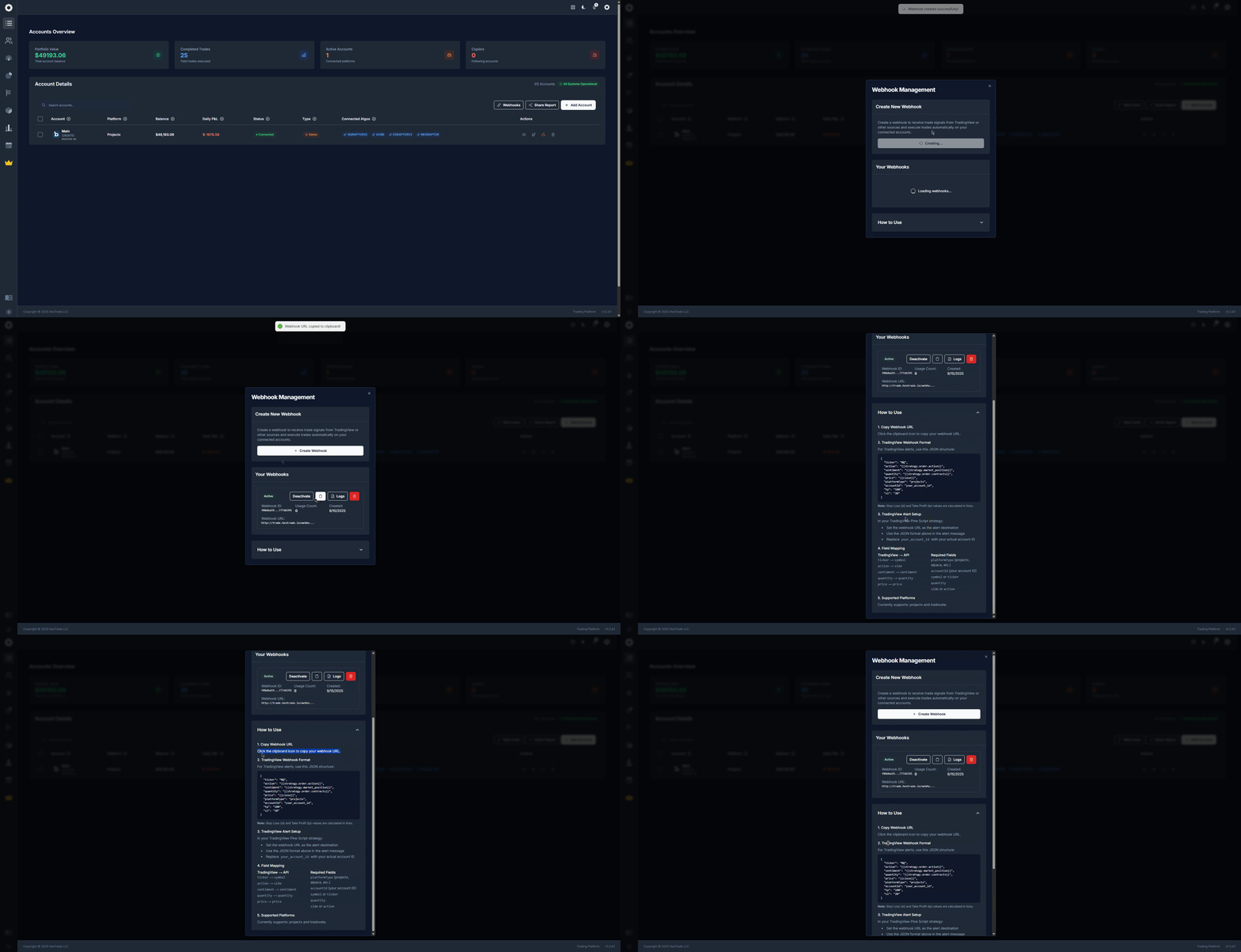
Visit [**dash.hextrade.io/accounts**](https://dash.hextrade.io/accounts) and open the **Webhooks** section.
Copy your unique Hextrade webhook URL — it looks like:
```
https://api.hextrade.io/webhook/your-unique-token
```
In TradingView, open the chart where your strategy is applied. Click **"Add Alert"** (or right-click → Add Alert).
* **Condition** — Select your strategy and the trigger condition (e.g. `strategy.order.action`).
* **Webhook URL** — Paste your Hextrade webhook URL.
* **Message** — Paste the JSON payload (from the template above). Replace `your_account_id` with your actual account ID from the Accounts page.
Adjust the following fields:
* `"platformType"` — Set to your broker (e.g. `"projectx"`, `"alpaca"`).
* `"accountId"` — Your account ID.
* `"ticker"` — Your instrument (e.g. `"NQ"`, `"ES"`, `"AAPL"`).
* `"tp"` and `"sl"` — Take profit and stop loss in ticks (optional).
Save the alert. The next time your strategy fires a signal, Hextrade will receive the webhook and execute the order on your connected broker.
Test with a **small quantity** (e.g. 1 micro contract) first to confirm the webhook is working correctly before scaling up.
 ***
## Example Payloads
### ProjectX — NQ Futures
```json theme={null}
{
"ticker": "NQ",
"action": "{{strategy.order.action}}",
"sentiment": "{{strategy.market_position}}",
"quantity": "{{strategy.order.contracts}}",
"price": "{{close}}",
"platformType": "projectx",
"accountId": "your_account_id",
"tp": "100",
"sl": "20"
}
```
### Alpaca — AAPL Equities
```json theme={null}
{
"ticker": "AAPL",
"action": "{{strategy.order.action}}",
"quantity": "{{strategy.order.contracts}}",
"price": "{{close}}",
"platformType": "alpaca",
"accountId": "your_account_id"
}
```
### Tradovate — ES Futures
```json theme={null}
{
"ticker": "ES",
"action": "{{strategy.order.action}}",
"sentiment": "{{strategy.market_position}}",
"quantity": "{{strategy.order.contracts}}",
"price": "{{close}}",
"platformType": "tradovate",
"accountId": "your_account_id",
"tp": "50",
"sl": "15"
}
```
***
## Troubleshooting
| Issue | Solution |
| --------------------------------- | -------------------------------------------------------------------------- |
| Webhook fires but no order placed | Check `accountId` — must match exactly from the Accounts page. |
| `platformType` error | Use lowercase: `projectx`, `tradovate`, `alpaca`, `dxtrade`, `tradier`. |
| `tp`/`sl` not working | These are in **ticks**, not dollars. Verify tick size for your instrument. |
| Alert not triggering | Ensure the TradingView alert is active and the strategy is on the chart. |
| Order rejected by broker | Check account balance, position limits, and broker-side trading hours. |
TradingView alerts have a **delivery delay** of up to a few seconds. For highly time-sensitive strategies, account for this latency. Always monitor the first few live executions carefully.
***
## Security
* Your webhook URL contains a **unique token** — keep it private.
* Do not share your webhook URL publicly (e.g. in Discord or GitHub).
* If compromised, regenerate your token from the [Accounts page](https://dash.hextrade.io/accounts).
***
## Example Payloads
### ProjectX — NQ Futures
```json theme={null}
{
"ticker": "NQ",
"action": "{{strategy.order.action}}",
"sentiment": "{{strategy.market_position}}",
"quantity": "{{strategy.order.contracts}}",
"price": "{{close}}",
"platformType": "projectx",
"accountId": "your_account_id",
"tp": "100",
"sl": "20"
}
```
### Alpaca — AAPL Equities
```json theme={null}
{
"ticker": "AAPL",
"action": "{{strategy.order.action}}",
"quantity": "{{strategy.order.contracts}}",
"price": "{{close}}",
"platformType": "alpaca",
"accountId": "your_account_id"
}
```
### Tradovate — ES Futures
```json theme={null}
{
"ticker": "ES",
"action": "{{strategy.order.action}}",
"sentiment": "{{strategy.market_position}}",
"quantity": "{{strategy.order.contracts}}",
"price": "{{close}}",
"platformType": "tradovate",
"accountId": "your_account_id",
"tp": "50",
"sl": "15"
}
```
***
## Troubleshooting
| Issue | Solution |
| --------------------------------- | -------------------------------------------------------------------------- |
| Webhook fires but no order placed | Check `accountId` — must match exactly from the Accounts page. |
| `platformType` error | Use lowercase: `projectx`, `tradovate`, `alpaca`, `dxtrade`, `tradier`. |
| `tp`/`sl` not working | These are in **ticks**, not dollars. Verify tick size for your instrument. |
| Alert not triggering | Ensure the TradingView alert is active and the strategy is on the chart. |
| Order rejected by broker | Check account balance, position limits, and broker-side trading hours. |
TradingView alerts have a **delivery delay** of up to a few seconds. For highly time-sensitive strategies, account for this latency. Always monitor the first few live executions carefully.
***
## Security
* Your webhook URL contains a **unique token** — keep it private.
* Do not share your webhook URL publicly (e.g. in Discord or GitHub).
* If compromised, regenerate your token from the [Accounts page](https://dash.hextrade.io/accounts).