Trading Accounts
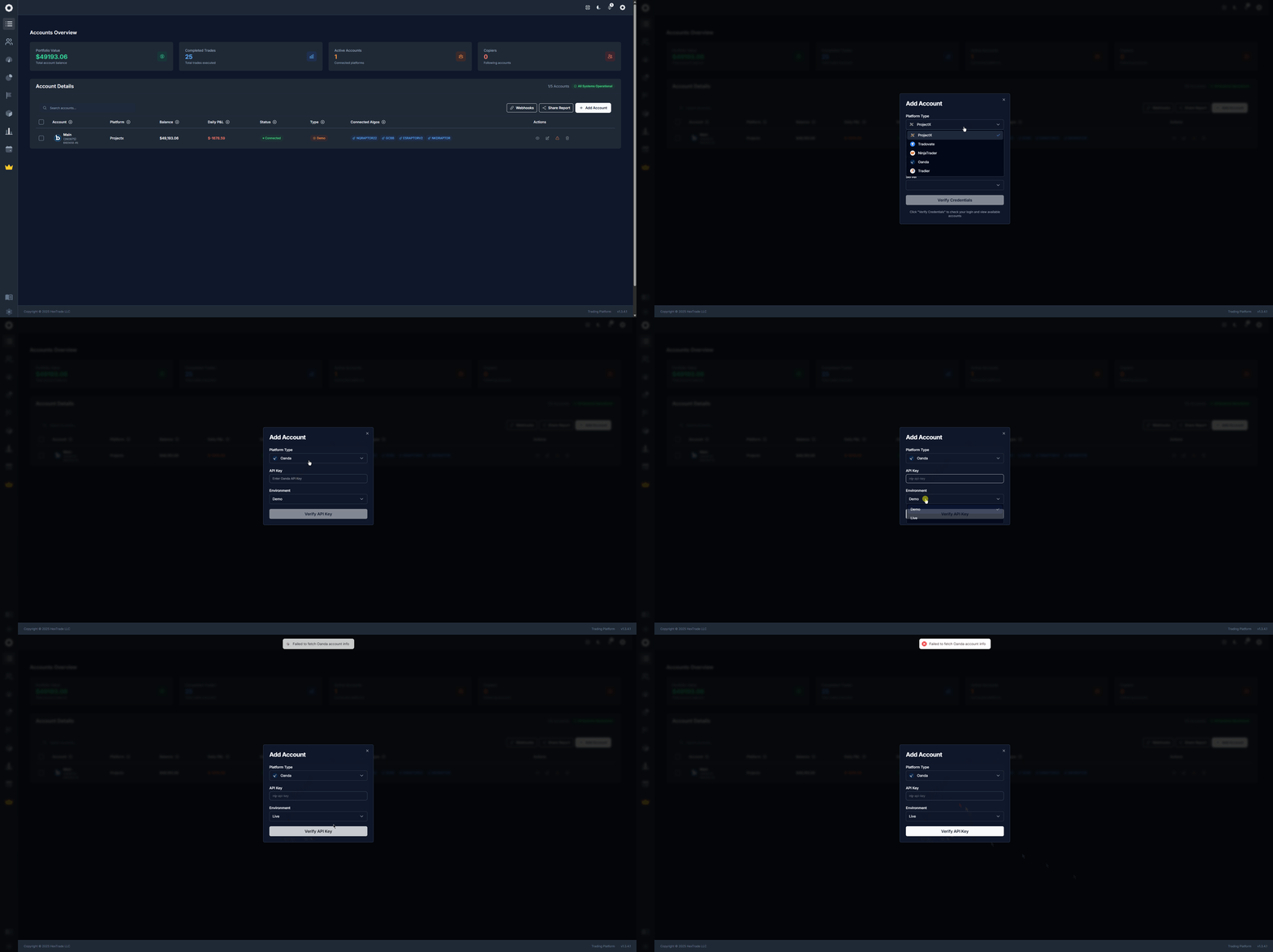
To start automated trading, copy trading, or webhook-based algorithmic trading, you first need to connect a broker account to Hextrade. Once connected, your account appears in the accounts table and is available for algorithms, copy groups, and manual trading.Adding an Account
1
Navigate to Accounts
Go to Hextrade Accounts and click “Add Account”.
2
Select your platform
Choose your broker or prop firm from the supported platforms list (see below).
3
Fill in required details
Enter the credentials or API keys provided by your broker or prop firm. Each platform has slightly different required fields.
4
Verify the account
Once submitted and verified, the account appears in your accounts table — ready to manage.
Supported Platforms
Hextrade supports a growing list of brokers and prop firms:ProjectX
Prop trading platform with full futures support. Webhooks, algorithms, and copy trading supported.
Tradovate
Futures and trading platform. Full algorithm and copy trade integration.
NinjaTrader
Popular futures and forex platform. Connect and run automated strategies.
Tradier
Equities and multi-leg options. Market, limit, stop, stop-limit; day and GTC orders.
Oanda
Forex and CFDs. Connect and trade currency pairs with algorithms.
DxTrade
Multi-asset platform with full dashboard integration.
Alpaca
Commission-free equities API. Fast, developer-friendly connectivity.
CQG
Futures and derivatives connectivity. Industry-standard market data.
More platforms are added regularly. Join the Discord server to request a new integration or check what’s coming.
Platform Comparison
️ Account Limits
The number of accounts you can connect depends on your subscription plan:- Free / Beta — Up to 20 accounts
- Upgraded plans — Higher limits available
- Unlimited accounts — Available on select plans
What to Do Next
Once your account is connected, you can:Find an Algorithm
Browse and activate algorithms on your connected account.
Set Up Copy Trading
Use this account as master or follower in a copy-trade group.
Connect a Webhook
Use your own TradingView strategy to drive trades on this account.
View Analytics
Analyze this account’s performance, P&L, and trade history.