Setting up Copy Trading
Copy trading on Hextrade lets you efficiently manage multiple accounts with different risk profiles from a single dashboard. One account acts as the master — any trade it makes is automatically replicated across all follower accounts in the group. Visit dash.hextrade.io/copy-trade-groups to get started.Key Features
️ Risk Multipliers
Set a risk multiplier per group based on the master account’s position size. Control how aggressively followers scale their trades.
Descriptive Groups
Add detailed descriptions to each group — document the origin, logic, or strategy behind the account grouping.
️ Custom Grouping
Create as many groups as your plan allows, each with a unique name and distinct risk profile.
Automatic Execution
Trades placed on the master are instantly replicated to all active followers — no manual intervention required.
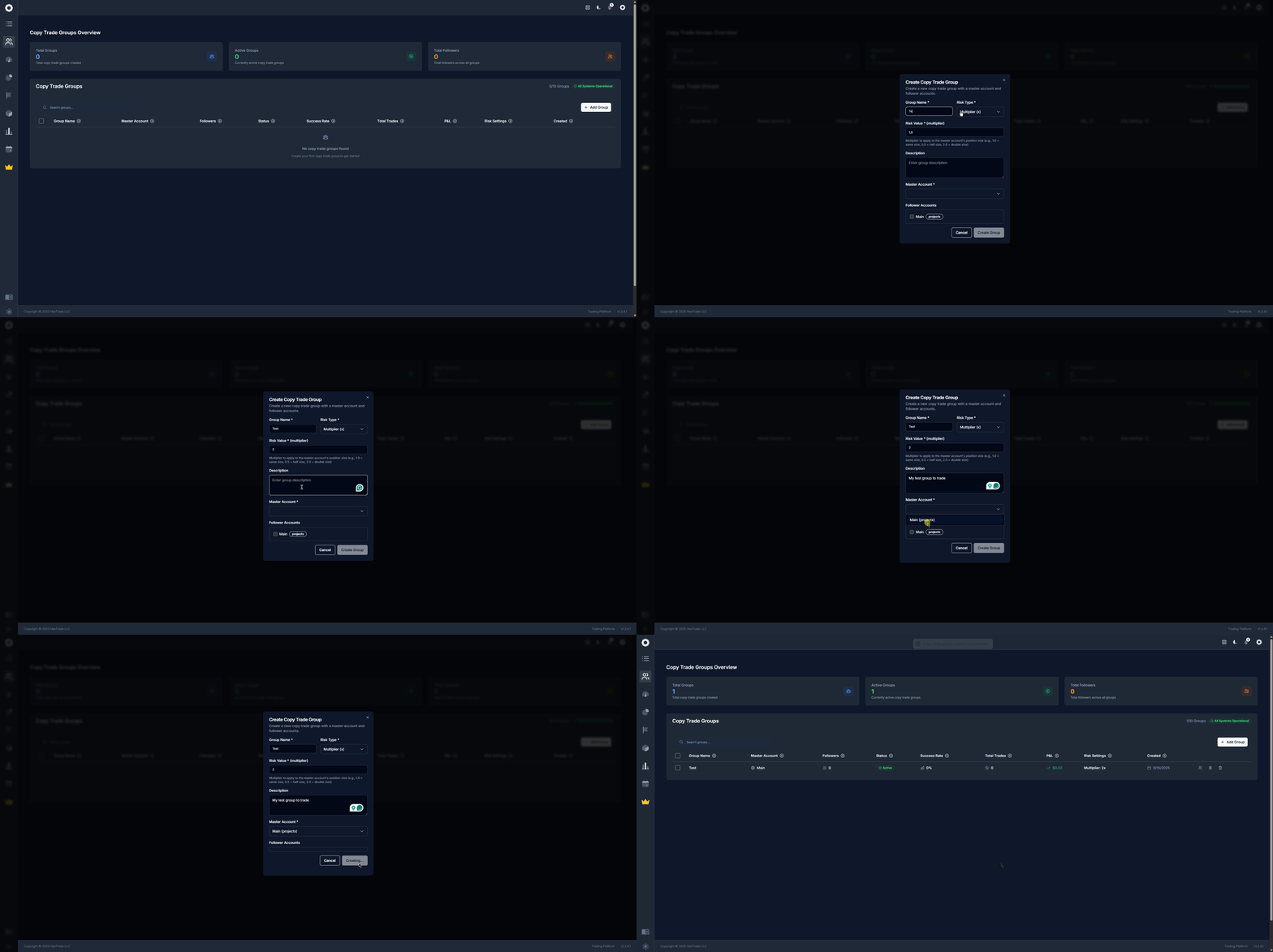
️ Creating a Copy Trade Group
1
Go to Copy Trade Groups
Visit dash.hextrade.io/copy-trade-groups and click “Add Group”.
2
Enter a group name
Give your group a distinctive, memorable name that reflects the strategy (e.g. “NQ Scalp — Low Risk” or “Tradovate Primary”).
3
Add a description (recommended)
Use the description field to document the strategy’s logic, source, or any notes for future reference. This is especially useful when managing multiple groups.
4
Select the master account
Choose the master account — this is the account whose trades will be copied to all followers. It should be the account running your main algorithm or strategy.
5
Add follower accounts
Select one or more follower accounts. These can be accounts across different brokers (all must be connected — see Trading Accounts).
6
Set the risk multiplier
Define the risk multiplier for each follower:
1.0= same position size as master0.5= half the size (lower risk)2.0= double the size (higher risk)
7
Save and activate
Click Save. Set the group status to Active to begin copying trades immediately.
Managing Groups
Once a group is created, you can:What You’ll See on the Copy Trade Page
At the top, summary stats give you a quick overview:- Total groups — How many groups you’ve created.
- Active groups — Groups currently copying trades.
- Total followers — Combined follower count across all groups.
- Success rate — Average % of copied trades that closed in profit.
Tips for Effective Copy Trading
Follower accounts must be on a supported platform. Not all broker combinations support cross-platform copying — verify compatibility on the Trading Accounts page.