Setting up TradingView Webhooks
Use your own TradingView Pine Script strategy and let Hextrade automatically execute orders on your connected broker accounts. No code changes required on your broker side — just set the webhook URL and use the correct JSON format.Supported Platforms for Webhooks
ProjectX
Futures trading on ProjectX via TradingView webhook.
Tradovate
Futures on Tradovate. Set
platformType to tradovate.Alpaca
Equities on Alpaca. Set
platformType to alpaca.DxTrade
Multi-asset via DxTrade. Set
platformType to dxtrade.Tradier
Equities and options via Tradier. Set
platformType to tradier.More coming
Additional platforms added regularly. Check Discord for updates.
TradingView Webhook JSON Format
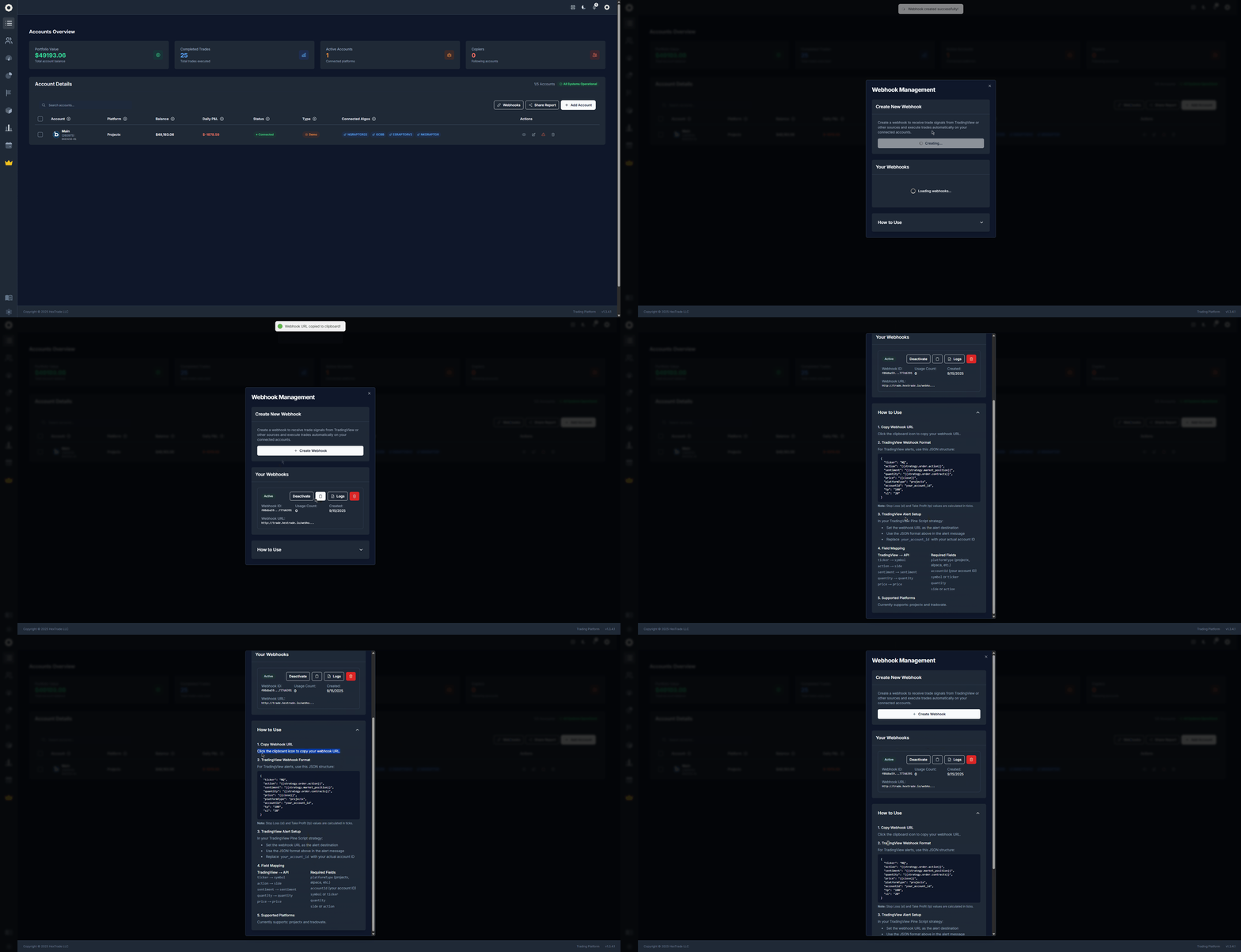
When creating a TradingView alert, use the following JSON in the alert message. Hextrade will parse this and place the corresponding order on your connected broker.tp (Take Profit) and sl (Stop Loss) values are calculated in ticks, not dollars. Ensure these match your instrument’s tick size.️ Field Mapping: TradingView → Hextrade API
Required Fields
Every webhook payload must include:Optional Webhook Parameters
You can add these optional fields to control logging, risk limits, session/day filters, and order behavior.Optional inputs
Session filters: Use
session + sessionTimezone to allow only regular trading hours (RTH) or extended hours (ETH). Use tradeWindow for custom day-of-week and time ranges (e.g. Mon–Fri 06:30–16:00 ET).
cooldown and maxTradesPerDay use in-memory state; they reset when the process restarts.session “RTH” = 09:30–16:00 in the given timezone; “ETH” = outside that window.callbackUrl receives a POST with success, trade/result, error (on failure), logId, strategyName, note, tags, etc.dryRun: true returns HTTP 200 with dryRun: true and the planned tradeData; no order is sent and cooldown/maxTradesPerDay are not updated.Example payload with optional parameters
Setting Up the Webhook in TradingView
1
Get your Webhook URL
Visit dash.hextrade.io/accounts and open the Webhooks section.Copy your unique Hextrade webhook URL — it looks like:
2
Open your Pine Script strategy in TradingView
In TradingView, open the chart where your strategy is applied. Click “Add Alert” (or right-click → Add Alert).
3
Configure the alert
- Condition — Select your strategy and the trigger condition (e.g.
strategy.order.action). - Webhook URL — Paste your Hextrade webhook URL.
- Message — Paste the JSON payload (from the template above). Replace
your_account_idwith your actual account ID from the Accounts page.
4
Customize the JSON for your instrument
Adjust the following fields:
"platformType"— Set to your broker (e.g."projectx","alpaca")."accountId"— Your account ID."ticker"— Your instrument (e.g."NQ","ES","AAPL")."tp"and"sl"— Take profit and stop loss in ticks (optional).
5
Save and test the alert
Save the alert. The next time your strategy fires a signal, Hextrade will receive the webhook and execute the order on your connected broker.
Example Payloads
ProjectX — NQ Futures
Alpaca — AAPL Equities
Tradovate — ES Futures
Troubleshooting
Security
- Your webhook URL contains a unique token — keep it private.
- Do not share your webhook URL publicly (e.g. in Discord or GitHub).
- If compromised, regenerate your token from the Accounts page.